Hosted Sinks: Stream Blockchain Data Straight Into Your Postgres or ClickHouse Database
Getting on-chain data into a database has always been the annoying part. You can write the mapping logic, but then you have to run it: provision servers, babysit a sink process, handle chain reorgs, rotate credentials, and re-sync whenever something drifts. That is a platform team's worth of work standing between you and a table you can query.
Hosted Sinks removes that work. It is a fully managed Substreams-sink-as-a-service on The Graph Market. You point it at a Substreams package and a database, click Deploy, and StreamingFast runs the sink for you at scale, securely, with zero ops on your side. Fresh chain data starts landing in your tables in minutes, and you query it with the SQL tools you already use.
This post covers what Hosted Sinks does, how developers use it, how to connect it to managed database providers like Supabase, Neon, and ClickHouse Cloud, as well as how to monitor and manage a sink once it is live.
What a Hosted Sink actually does
A Substreams package transforms raw blockchain data into structured output. A sink takes that output and writes it somewhere; in this case, your database. Normally you would run that sink process yourself. A Hosted Sink runs it for you.
Concretely, a hosted sink continuously reads data from your Substreams package and writes it into your own Postgres or ClickHouse database. You bring the .spkg (with a db_out module or relational mappings) and the database connection details. StreamingFast provisions the infrastructure, keeps it running on distributed, highly available infrastructure, and streams data in as new blocks arrive.
A few things that make this different from rolling your own blockchain ETL pipeline:
- No new runtime on your infrastructure. Your Substreams package maps Protobuf straight into relational tables. There is no blockchain plumbing to operate; you read the results back with plain SQL.
- Reorg-aware and always correct. Substreams tracks the canonical chain and surfaces fork signals automatically. When a chain reorganizes, the sink applies the right inserts, updates, and upserts, so you never end up with sheared or stale data. No manual cleanup.
- Cursor-managed, so it self-heals. The sink checkpoints its position and resumes from the exact last confirmed block after any interruption. No data re-indexed from scratch, no gaps.
- Postgres or ClickHouse, your call. Choose Postgres for transactional, app-facing data or ClickHouse for columnar analytics and dashboards.
- Every chain on The Graph Market. Ethereum, Base, Solana, and beyond.
How developers leverage this
The value shows up fastest when you have a concrete query you want to run against live, real-time blockchain data. A few examples:
Powering an app backend. Say you are building a wallet or portfolio app and you need current ERC-20 balances and transfers on Base. Deploy a Substreams package with a db_out module into Postgres, name the sink base-erc20-transfers, and your application reads balances with a normal SELECT. No RPC calls, no indexer to maintain. Because the sink upserts on reorgs, the balances your users see stay correct, even through chain reorganizations.
Analytics dashboards. If you are tracking DEX volume, TVL, or NFT floor prices, point the same package at ClickHouse instead. ClickHouse's columnar storage makes aggregations over millions of rows fast, so a Grafana or Metabase dashboard querying daily swap volume stays responsive as your history grows.
Feeding a data pipeline. Because the output is just tables in your own database, anything downstream that speaks SQL (dbt models, a Python job, a BI tool) works out of the box. You are not integrating against a proprietary API; you are querying a database you already own.
The pattern is the same each time: write (or fork an existing package from substreams.dev), pick your database, and let the sink keep the tables fresh. You spend your time on the query and the product, not on the pipeline.
Setting up: managed database walkthroughs
Your database needs to be reachable from StreamingFast's infrastructure (which runs from us-central1 in Iowa). The docs include step-by-step walkthroughs for the three most common managed providers so you do not have to guess at connection settings.
- Supabase: managed Postgres with a generous free tier. The key detail: use the direct connection host (
db.<project-ref>.supabase.co), not the pooler host, since PgBouncer interferes with the sink's prepared statements. SSL moderequireor higher. - Neon: serverless Postgres that scales to zero. A continuously running sink keeps the endpoint awake; just know that free-tier endpoints suspend after inactivity, so use a paid plan for production.
- ClickHouse Cloud: fully managed ClickHouse. Note two gotchas: it uses native port 9440 (TLS) rather than the standard 9000, so enable Secure (TLS), and you will need to open the IP Access List so StreamingFast can connect.
Across all three, the recommended pattern is the same: create a dedicated database user scoped to a single schema with write access, and hand the sink only those credentials. The walkthroughs include the exact CREATE USER and GRANT SQL for each provider.
Setting up the sink itself is a short form in the portal: give it a name, supply the package (a public URL or a substreams.dev ID like ethereum_common@v0.3.3), fill in the database connection, set your start block and output module (for example, db_out), and click Deploy. Alternatively, find the package you want to sink on substreams.dev and click the Hosted tab within the Run Package section. The sink moves through Deploying and, once pods are ready, Deployed, then begins indexing.
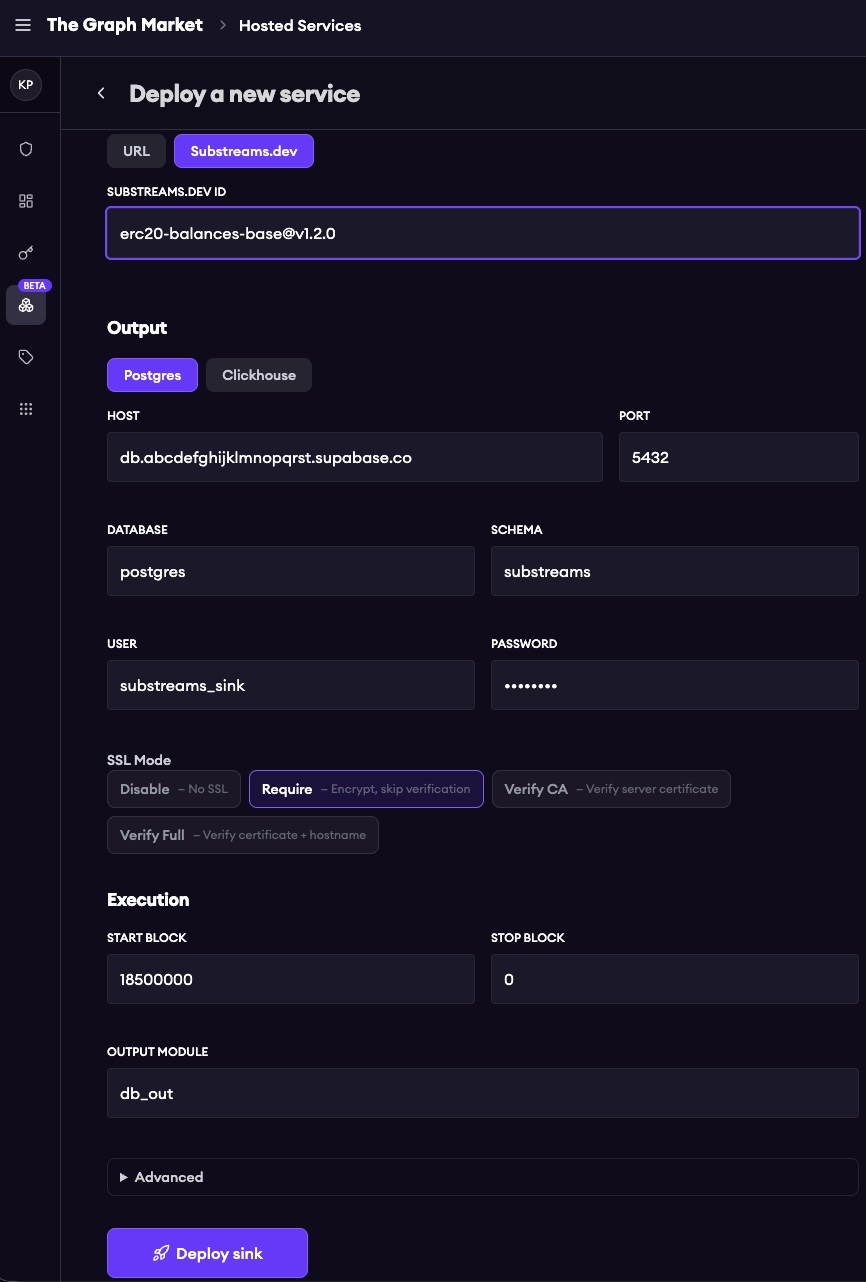
It's as simple as filling out a single form and clicking Deploy
Managing a sink after it is live
Deploying is only day one. The sink detail page gives you the day-two controls to run it in production.
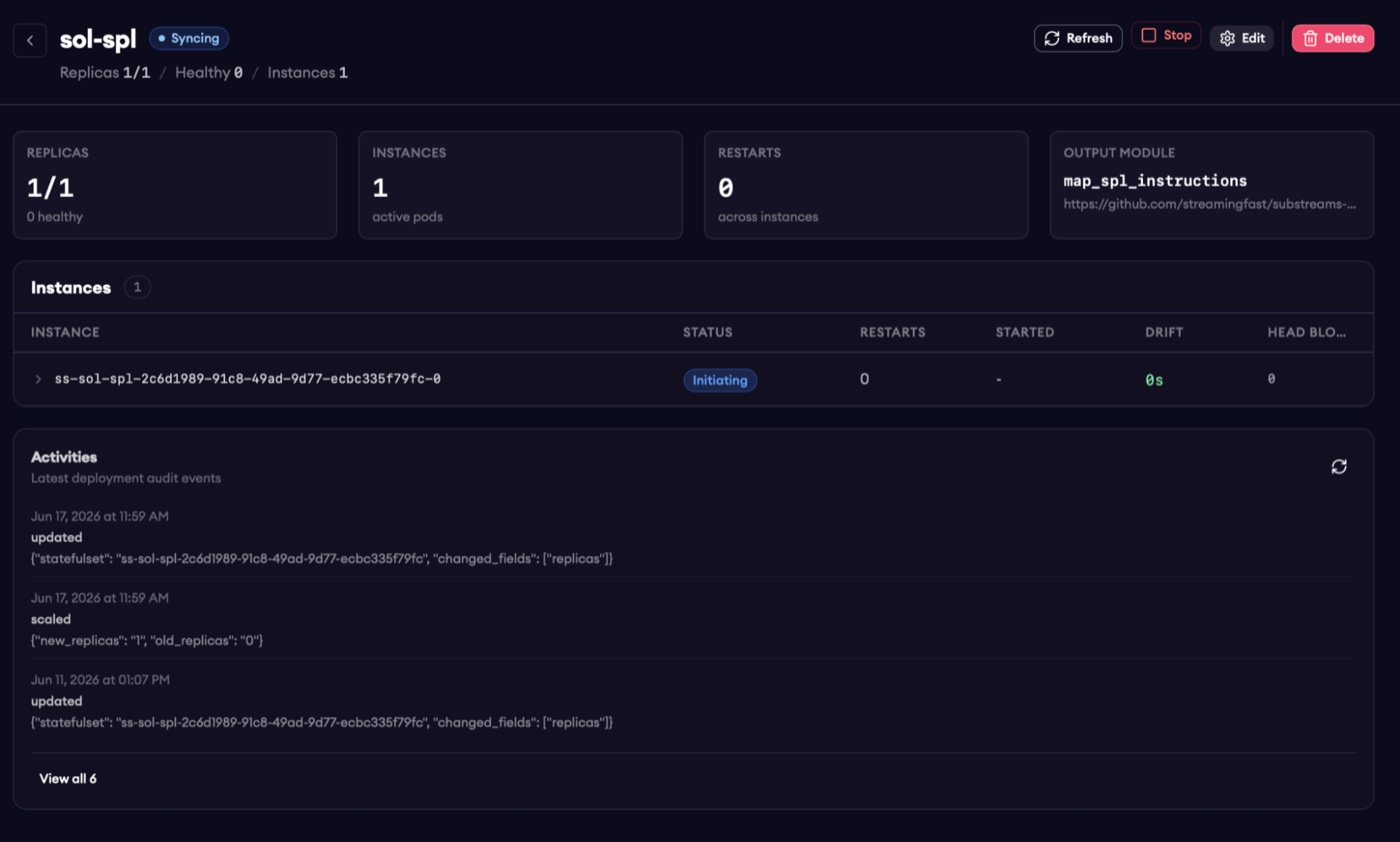
Visibility. A runtime summary shows replicas ready versus requested, active instances, and restart counts (elevated restarts flag instability). Each pod reports its current block versus the chain head and its head block time drift, the number of seconds behind real-time, where near zero means the pod is live and caught up. Pod-level states walk from Initiating to Catching up to Live, and a full deployment event log records every lifecycle change so you can audit or troubleshoot.
Editing without downtime. Need to update the package, change execution config, or rotate database credentials? Edit the sink in place and it rolls out gracefully; the process restarts automatically and resumes from its last cursor.
Stop, start, reset. Stop scales the deployment to zero replicas while preserving the config; start resumes from the last cursor, so nothing is re-indexed from scratch. If you do want a clean slate, say your schema changed, reset from a new start block to re-sync from the beginning. (Resetting is irreversible and clears the target schema, so it is a deliberate choice, not an accident.)
Deleting. Deleting removes the hosted sink process and its pods. Your database and its data are untouched; only the managed sink goes away.
What it costs
Billing works the way it does today: you pay only for the data coming out of your Substreams. Until the end of 2026, StreamingFast manages the sink itself for free. After that, each sink carries a negligible monthly cost, confirmed with you before any billing begins.
The bottom line
Hosted Sinks abstracts away the credential management, the scaling, and the re-sync headaches, and hands you back a simple form and a Deploy button. You stop staffing a platform team to move blockchain data into a database, and start querying that data with the SQL tools you already know.
Your data. Your database. StreamingFast's infrastructure. Live in minutes.